
Windows Movie Maker
by InCrEdIBlE AppZ • View Storefront
Include Video Editor & Movie Maker.
Easy to Make Movies from Your Images and Video Clips.
Add Effects, Text, Animations, Subtitles, Music to Videos.
Full-Featured Screen Recorder Integrated.
For Windows 11/10 and below
404
Easy to Start & Powerful
Easy to Start for new beginners to make movies and edit videos. Simple Drag & Drop interface.
Include Movie Maker & Video Editor. Everything you need to make movies and edit videos. Free Download Now.
function-edit
Import
function-audio
Audio
function-color
Transitions
function-effects
Effects
function-ux
Templates
Import media files (videos, images, audio clips) directly onto the timeline for fast and easy editing.
Add background music to enhance the emotional impact of your video. Just select from built-in music liabrary.
Built-in transition effects to add between clips. Create smooth and professional transitions that enhance the overall flow of your video.
Reinforce your video effects with all the amusing titles, stickers, intros, and outros! Just select from built-in stock.
A variety of pre-designed video templates. Perfect for creating anything from short promotional videos to home movies and more.
Powerful editing tools for experienced video creators
Trim and Cut
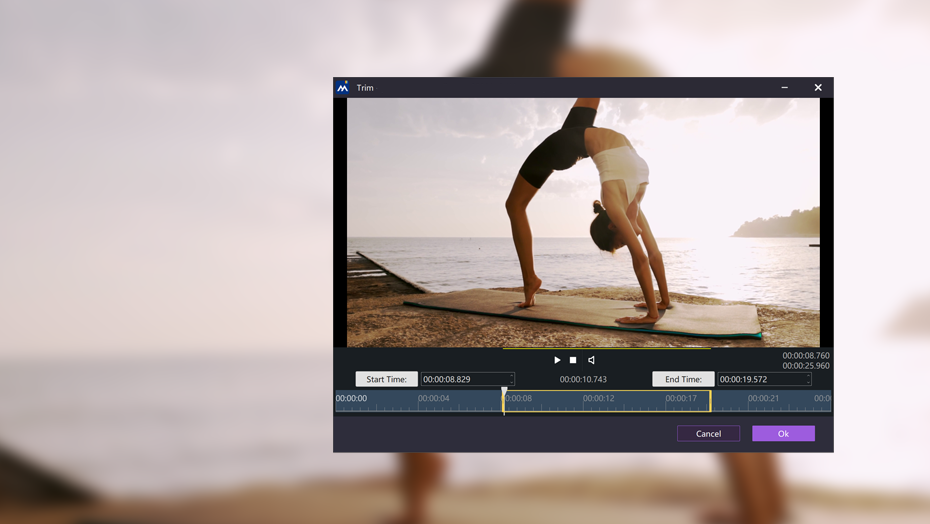
Trim or cut unwanted sections of your video by simply dragging the trimming handles.
Merge Videos
Split Videos
Add Transitions
Speed Video
Rich Media resources to enhance the visual appeal
A wide range of
color correction filters and artistic effects
Transform the mood and style of your video.
A variety of special effects
Bring creativity and flair to your project.Such as fade-ins, fade-outs, rotations, zooms, and more
Various royalty-free music
Enhance the emotional impact of your video
Versatile export options to meet diverse needs
Win Movie Maker
Supported Formats
Support formats like MP4, WMV, AVI, MKV, FLV, MP3, WAV and more.
Win Movie Maker
Optimized for Sharing
Allow you to quickly upload your video to different platforms.
Win Movie Maker
Save the file locally
to your computer for future use.
Frequently Asked Questions
Which is the best video editor for beginners?
Win Movie Maker is the best video editor for beginners. You don’t need any prior experience to make high-quality videos. Win Movie Maker offers instant mode, preset templates, and auto beat sync to make a video in a few steps. Win Movie Maker also has green screen, keyframe, as well as plenty of features and effects that are easy to use.
Why should I choose Win Movie Maker & Video Editor?
What file formats does Win Movie Maker support?
Win Movie Maker vertical
Now, you have the support you need to
express, achieve, and grow your talents
📸 Screenshots
Easy to Make Movies from Your Images and Video Clips.
Add Effects, Text, Animations, Subtitles, Music to Videos.
Full-Featured Screen Recorder Integrated.
For Windows 11/10 and below
404
Easy to Start & Powerful
Easy to Start for new beginners to make movies and edit videos. Simple Drag & Drop interface.
Include Movie Maker & Video Editor. Everything you need to make movies and edit videos. Free Download Now.
function-edit
Import
function-audio
Audio
function-color
Transitions
function-effects
Effects
function-ux
Templates
Import media files (videos, images, audio clips) directly onto the timeline for fast and easy editing.
Add background music to enhance the emotional impact of your video. Just select from built-in music liabrary.
Built-in transition effects to add between clips. Create smooth and professional transitions that enhance the overall flow of your video.
Reinforce your video effects with all the amusing titles, stickers, intros, and outros! Just select from built-in stock.
A variety of pre-designed video templates. Perfect for creating anything from short promotional videos to home movies and more.
Powerful editing tools for experienced video creators
Trim and Cut
Trim or cut unwanted sections of your video by simply dragging the trimming handles.
Merge Videos
Split Videos
Add Transitions
Speed Video
Rich Media resources to enhance the visual appeal
A wide range of
color correction filters and artistic effects
Transform the mood and style of your video.
A variety of special effects
Bring creativity and flair to your project.Such as fade-ins, fade-outs, rotations, zooms, and more
Various royalty-free music
Enhance the emotional impact of your video
Versatile export options to meet diverse needs
Win Movie Maker
Supported Formats
Support formats like MP4, WMV, AVI, MKV, FLV, MP3, WAV and more.
Win Movie Maker
Optimized for Sharing
Allow you to quickly upload your video to different platforms.
Win Movie Maker
Save the file locally
to your computer for future use.
Frequently Asked Questions
Which is the best video editor for beginners?
Win Movie Maker is the best video editor for beginners. You don’t need any prior experience to make high-quality videos. Win Movie Maker offers instant mode, preset templates, and auto beat sync to make a video in a few steps. Win Movie Maker also has green screen, keyframe, as well as plenty of features and effects that are easy to use.
Why should I choose Win Movie Maker & Video Editor?
What file formats does Win Movie Maker support?
Win Movie Maker vertical
Now, you have the support you need to
express, achieve, and grow your talents
testadmin 2026-10-22 16:43:14
★★★★★
App has been tested and is SAFE FOR DOWNLOAD
★★★★★
App has been tested and is SAFE FOR DOWNLOAD
Please log in to leave a review.